
Ionic Angular Standalone created two import sources. For example, ModalController can be imported like this:
import { IonToolbar } from '@ionic/angular';
import { IonToolbar } from '@ionic/angular/standalone';
The former is for components available only when you import IonicModule; the latter imports components as Standalone Components. When I add imports by hand, I know the project is Standalone-ready, so I do not make mistakes—but IDE suggestions make it easy to pick the wrong path.
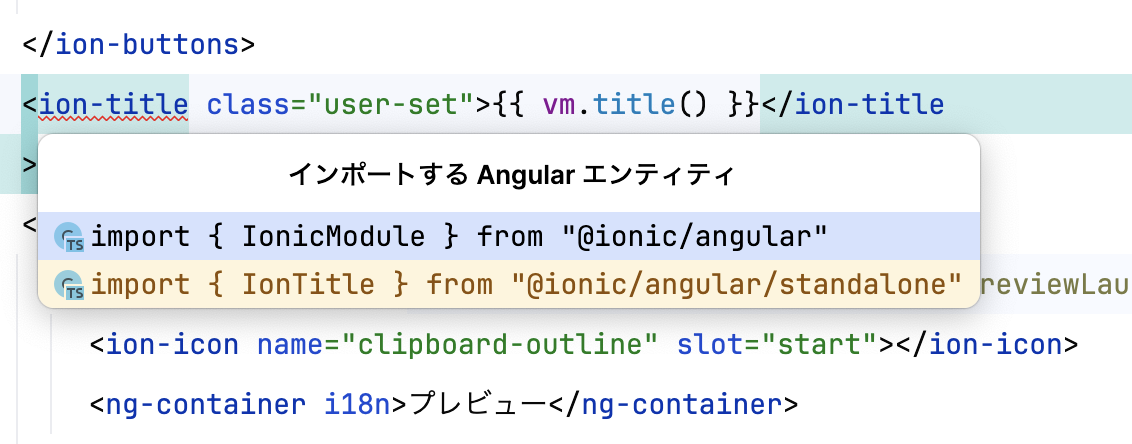
Also, if I import IonToolbar incorrectly, the IDE reports an error, which is fine. But OverlayController types such as ModalController fail at runtime without an IDE error, so it is hard to notice unless I run the app. So I created an ESLint rule that errors when you import from @ionic/angular. Set it up after migrating Ionic Angular to Standalone.
Usage
npm install @rdlabo/eslint-plugin-rules --save-dev
  {
    ...
+   "plugins": ["@rdlabo/rules"],
    "overrides": [
      {
        "files": [
          "*.ts"
        ],
      ...
        "rules": {
+         "@rdlabo/rules/deny-import-from-ionic-module": "error",
        }
      },
    ]
  }
When an error appears
> ng lint


Linting "app"...

/home/runner/work/winecode/winecode/app/src/app/list/modals/thread-over-view/thread-over-view.page.ts
Lint errors found in the listed files.
Error:   1:1  error  You must import from @ionic/angular/standalone instead of @ionic/angular  @rdlabo/rules/deny-import-from-ionic-module


✖ 1 problem (1 error, 0 warnings)
  1 error and 0 warnings potentially fixable with the `--fix` option.
Summary
It supports auto-fix as well, so I hope you will use it to avoid mistakes. See you next time.