
![[Trending] Do You Know Trapeze? Manage iOS and Android App Config from a Single YAML File cover image](/article-images/6d8f9064a3ec40.svg)
This article is day 11 of the Ionic Framework / Capacitor / Stencil Advent Calendar 2022.
Trapeze is a new Node.js tool born to configure and manage mobile applications from YAML files.
Opening Xcode and Android Studio every time to edit app version management or the iOS plist reason for camera permission is tedious, right? There are practical problems too. iOS and Android share the same version—does it mean anything to enter it manually on each side? And when you develop for web plus three platforms, the web app can take its version from package.json via a CI version tag while iOS and Android get the same number by hand—is that really okay?
Reference: GitHub Actions and np made product versioning and release flow ridiculously easy
Trapeze was created to solve those problems. Its predecessor was a Capacitor-only config tool called "Capacitor Configure", but it was renamed to Trapeze and now works with every native project (Xcode, Kotlin, Flutter, React Native—even Electron!). It shipped in May 2022, and looking at npm install trends since then, you can see how many people wanted to automate this instead of doing it by hand.
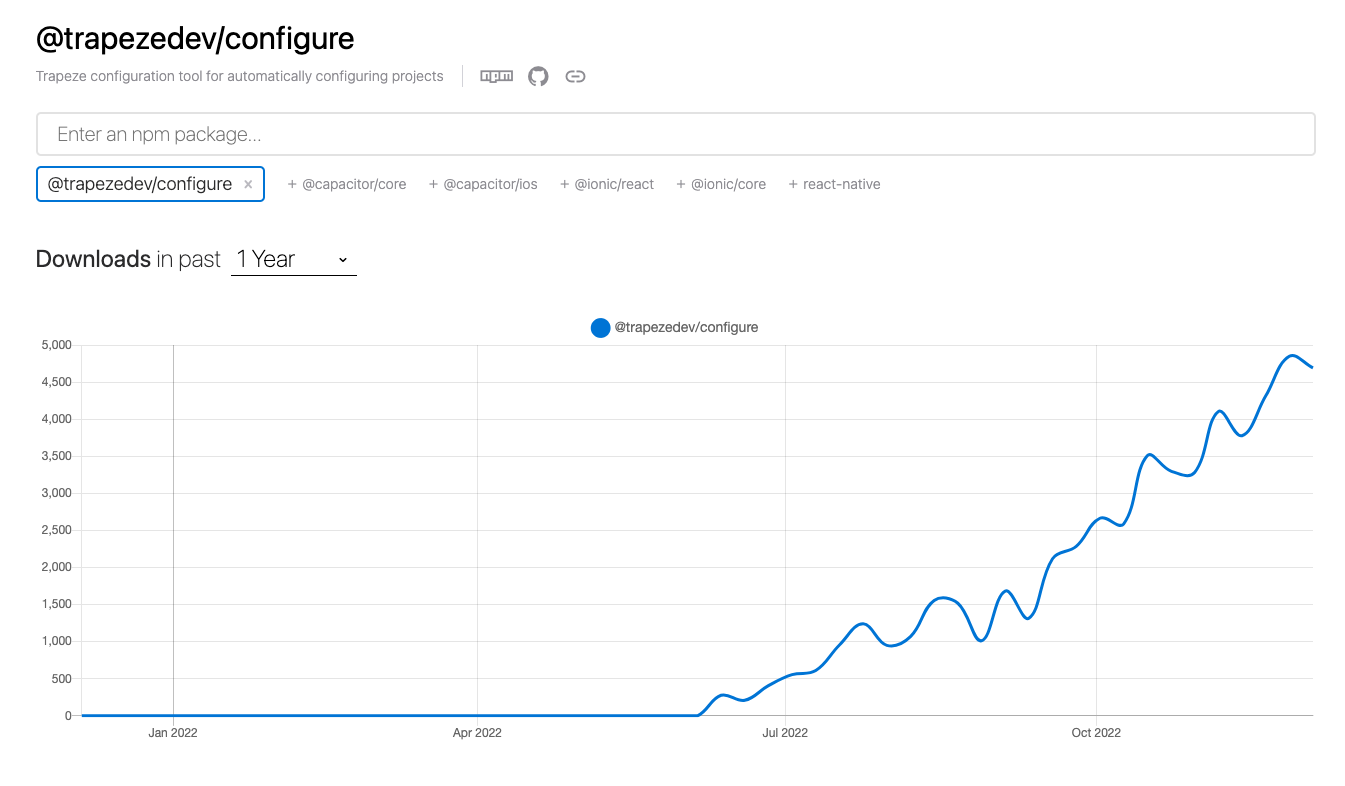
https://npmtrends.com/@trapezedev/configure
Usage
Start with the most basic usage. To add Trapeze to an existing project, run the following at the project root.
% npm install @trapezedev/configure
Simple, right. If you have already started development you should be fine, but for Android support JAVA_HOME must be set correctly. If you can already build Android apps, this is rarely an issue.
Next, prepare a config file. Put a config.yaml at the root and set Android versionName and iOS version so the following steps are clear. (I use config.yaml as the Trapeze config filename, but you can choose another name.)
platforms:
  android:
    versionName: 5.2.1
  ios:
    version: 16.4
Then apply the YAML with the trapeze command. The command takes native project folder paths. With Capacitor, for example, the iOS app lives under ios/App and Android under android from the root, so run:
% npx trapeze run config.yaml --android-project android --ios-project ios/App
You will see a confirmation screen like this.
sakakibara app % npx trapeze run config.yaml --android-project android --ios-project ios/App
run android versionName 1.3.1
run ios version 1.3.1
updated ios/App/App.xcodeproj/project.pbxproj
updated android/app/src/main/AndroidManifest.xml
updated android/app/build.gradle
updated ios/App/App/Info.plist
[?] Apply changes?
    Applying these changes will modify your source files. We recommend committing any changes before running this
    operation.
? Apply? › (y/N)
It asks Apply? › (y/N), so enter y and press Enter to apply the config to the native projects. Enter n to exit without applying.
Check the Git diff and you should see Android versionName and iOS version updated automatically. Adding --diff to the command lets you review the diff before applying, like this.
updated android/app/build.gradle
Index: android/app/build.gradle
===================================================================
--- android/app/build.gradle
+++ android/app/build.gradle
@@ -6,9 +6,9 @@
         applicationId "jp.rdlabo.winecode"
         minSdkVersion rootProject.ext.minSdkVersion
         targetSdkVersion rootProject.ext.targetSdkVersion
         versionCode 60000
-        versionName "6.0.0"
+        versionName "1.3.1"
See the official docs for how to write the YAML file.
https://trapeze.dev/docs/Operations/ios
https://trapeze.dev/docs/Operations/android
It hides the internals cleanly, so you can keep usage simple.
Automate package builds with GitHub Actions
If you already automate release flow with CI, you will want Trapeze to rewrite version numbers at build time. Here is how to use GitHub Actions with Trapeze to update version automatically when building the app.
Trapeze supports environment variables, so reference them in the YAML file. Use the vars key to specify CI environment variables. GITHUB_RUN_NUMBER is a GitHub Actions variable that represents the build number.
https://docs.github.com/ja/actions/learn-github-actions/environment-variables
Set GITHUB_RUN_NUMBER under vars. Also set a default so you avoid trouble from forgetting to configure the variable.
vars:
  GITHUB_RUN_NUMBER:
    default: 1

platforms:
  ios:
    buildNumber: $GITHUB_RUN_NUMBER
  android:
    versionCode: $GITHUB_RUN_NUMBER
That is all you need. When CI runs, GitHub assigns a unique value to GITHUB_RUN_NUMBER, and Trapeze can rewrite buildNumber and versionCode. You can also pass a release tag via a GitHub variable, like this.
vars:
  GITHUB_RUN_NUMBER:
    default: 1
  RELEASE_TAG:
    default: 1

platforms:
  ios:
    versionName: $RELEASE_TAG
    buildNumber: $GITHUB_RUN_NUMBER
  android:
    version: $RELEASE_TAG
    versionCode: $GITHUB_RUN_NUMBER
You can automate many app environment settings that used to require manual work with Trapeze. If you maintain native projects, give it a try.
See you next time.