
Do you write elements like this in Ionic Angular templates?
<ion-item button="true"></ion-item>
<ion-progress-bar value="50"></ion-progress-bar>
<ion-radio labelPlacement="center"></ion-radio>
This code looks correct at a glance, but TypeScript's type information actually reports errors. Many Ionic component attributes expect boolean, number, or specific string literal types—not plain strings.
HTML vs. JS frameworks
In plain HTML, every attribute value is treated as a string. The same applies to Ionic components—for example:
<!-- Ionic component: processed as a string -->
<ion-item button="true" disabled="false">
<ion-progress-bar value="50">
Here, the Ionic Framework receives the string "true" for button="true" and converts it internally to the appropriate type (boolean).
With Angular, however, components.d.ts defines strict types for each component's attributes:
// Example from @ionic/core/dist/types/components.d.ts
interface IonItem {
  button?: boolean;  // Expects a boolean
  disabled?: boolean;
  lines?: 'full' | 'inset' | 'none';  // Expects specific string literal types
}
TypeScript type-checks against these definitions, which leads to problems like:
<!-- TypeScript type checking reports an error -->
<ion-item button="true">  <!-- string "true" ≠ boolean true -->
<ion-item lines="invalid">  <!-- "invalid" is not an allowed value -->
Recent WebStorm versions now surface these type-check errors:
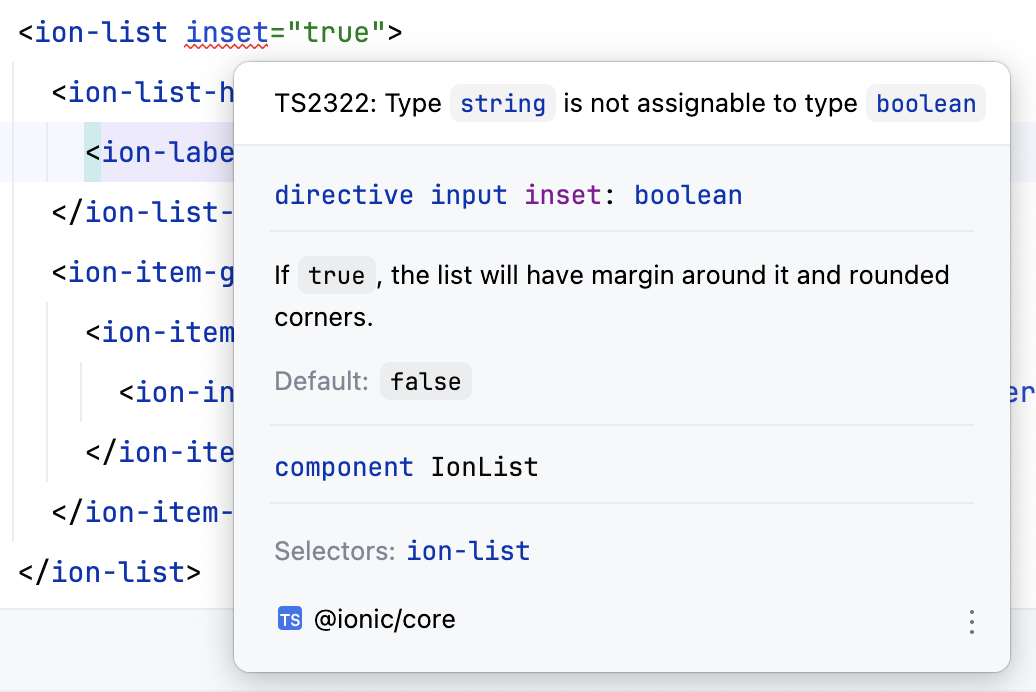
This TypeScript checking targets built Ionic components, so it does not block the Angular build. Still, seeing type errors pushes developers to learn the correct way to write code.
So I built an ESLint rule to detect this problem early and auto-fix it.
One-shot fix with an ESLint rule
I developed the @rdlabo/rules/ionic-attr-type-check ESLint rule to address this at the root. "Does not block the build" also means you cannot get a list of errors in one place—you had to eyeball errors and fixes in the IDE, which was not practical.
Main features
1. Automatic type detection
At runtime the rule loads @ionic/core/dist/types/components.d.ts and dynamically parses attribute types for each Ionic component. That gives you:
- Coverage for all Ionic components:
ion-item,ion-button,ion-modal, and the rest - Automatic type classification: boolean, number, and string literal unions
- Future Ionic versions: loading from the type definition file means new components and attributes are picked up automatically
2. Validation and fix support
The rule validates the following types and reports errors:
Boolean attributes
<!-- ❌ Before -->
<ion-item button="true" disabled="false"></ion-item>
<ion-toggle checked="true"></ion-toggle>

<!-- ✅ After -->
<ion-item [button]="true" [disabled]="false"></ion-item>
<ion-toggle [checked]="true"></ion-toggle>
Number attributes
<!-- ❌ Before -->
<ion-progress-bar value="50" buffer="75"></ion-progress-bar>
<ion-range min="0" max="100"></ion-range>

<!-- ✅ After -->
<ion-progress-bar [value]="50" [buffer]="75"></ion-progress-bar>
<ion-range [min]="0" [max]="100"></ion-range>
String literal union attributes
<!-- ❌ An error is displayed -->
<ion-item lines="invalid"></ion-item>
<ion-radio labelPlacement="center"></ion-radio>

<!-- ✅ Correct value -->
<ion-item lines="full"></ion-item>
<ion-radio labelPlacement="start"></ion-radio>
3. Auto-fix
The current version supports auto-fix for boolean and number attributes:
npx eslint --fix src/**/*.html
String literal union attributes are detection-only for now.
Usage
Installation
npm install @rdlabo/eslint-plugin-rules --save-dev
Configuration
Add the following to your ESLint config (eslint.config.js):
import rdlabo from '@rdlabo/eslint-plugin-rules';

export default [
  {
    files: ['*.html'],
    plugins: {
      '@rdlabo/rules': rdlabo,
    },
    rules: {
      '@rdlabo/rules/ionic-attr-type-check': 'error',
    },
  }
];
That enables attribute type checking for Ionic components in HTML template files.
Example in practice
If you write code like this during development:
<ion-item button="true" lines="true">
  <ion-label>Settings</ion-label>
</ion-item>
<ion-progress-bar value="50"></ion-progress-bar>
ESLint reports errors like:
error  Attribute 'button' expects boolean type, use property binding [button]="true"  @rdlabo/rules/ionic-attr-type-check
error  Attribute 'lines' expects string literal type, use valid value like "full", "inset", or "none"  @rdlabo/rules/ionic-attr-type-check
error  Attribute 'value' expects number type, use property binding [value]="50"  @rdlabo/rules/ionic-attr-type-check
With the --fix option, it automatically corrects to:
<ion-item [button]="true" lines="full">
  <ion-label>Settings</ion-label>
</ion-item>
<ion-progress-bar [value]="50"></ion-progress-bar>
Implementation highlights
How dynamic type parsing works
The rule follows these steps:
- Load the type definition file: parse
@ionic/core/dist/types/components.d.ts - Extract component info: get each component's attributes and their types
- Parse templates: find Ionic components in HTML templates
- Run type checks: compare attribute values to expected types
- Generate fix suggestions: propose property bindings or valid values
Performance optimizations
- Caching: type info is cached on first load for better performance
- Parse only when needed: type checks run only when Ionic components are detected
- Efficient string handling: fast template parsing with regular expressions
Effects in real projects
Projects that adopted this rule have seen:
Faster development
- Shorter code reviews: catching type-related issues upfront reduces review comments
- Less debugging: preventing runtime errors saves significant debugging time
Better code quality
- Consistent style: unified property binding usage across the team
- Stronger TypeScript safety: fewer compile-time errors
Lower learning curve
- Onboarding: newcomers learn correct Ionic usage through ESLint errors
- Less doc hunting: error messages show the correct type for each attribute
Summary
Attribute type mismatches were a frequent pain in Ionic Angular development. The @rdlabo/rules/ionic-attr-type-check rule I built provides:
- Automatic detection: validates boolean, number, and string literal union attributes on Ionic components
- Auto-fix: bulk fixes with ESLint's
--fixoption - Dynamic behavior: reads attribute info from the type definition file at runtime
- Future-proofing: adapts automatically to new Ionic versions
Developers can build Ionic Angular apps more safely and efficiently.
If your team uses Ionic Angular, consider adopting it—you should see better code quality and smoother development.
For details and the latest updates, see the GitHub repository.