

Ionic Angular can now be used in a Standalone setup. That will change how I build apps going forward. Using example.component.ts as an example, the diff looks like this.
 import { CommonModule } from '@angular/common';
 import { FormsModule } from '@angular/forms';
-import { IonicModule, ModalController } from '@ionic/angular';
+import { ModalController } from '@ionic/angular/standalone';
+import { addIcons } from 'ionicons';
+import {
+  wineOutline,
+  receiptOutline,
+  timeOutline,
+  walletOutline,
+  fileTrayStackedOutline,
+  calendarOutline,
+  documentTextOutline,
+} from 'ionicons/icons';

+import {
+  IonHeader,
+  IonToolbar,
+  IonButtons,
+  IonButton,
+  IonContent,
+  IonText,
+  IonList,
+  IonItem,
+  IonLabel,
+  IonIcon,
+  IonInput,
+  IonListHeader,
+  IonRadioGroup,
+  IonRadio,
+  IonNote,
+} from '@ionic/angular/standalone';

 @Component({
   selector: 'app-move-bottle',
   templateUrl: './move-bottle.page.html',
   styleUrls: ['./move-bottle.page.scss'],
   standalone: true,
-  imports: [IonicModule, FormsModule, CommonModule, KeyTrackByPipe],
+  imports: [
+    FormsModule,
+    CommonModule,
+    KeyTrackByPipe,
+    IonHeader,
+    IonToolbar,
+    IonButtons,
+    IonButton,
+    IonContent,
+    IonText,
+    IonList,
+    IonItem,
+    IonLabel,
+    IonIcon,
+    IonInput,
+    IonListHeader,
+    IonRadioGroup,
+    IonRadio,
+    IonNote,
+  ],
 })
 export class ExampleComponent implements OnInit {
-  constructor() {}
+  constructor() {
    addIcons({ wineOutline, receiptOutline, timeOutline, walletOutline, fileTrayStackedOutline, calendarOutline, documentTextOutline });
+  }
Long, right? With this many lines, using Ionic components feels tedious. There was feedback on that in an issue— I read through it below.
feat: Ionic Angular standalone component feedback #28445
The most useful starting point for best practices is this issue on the Ionic Framework repository. In short: developer experience got worse.
https://github.com/ionic-team/ionic-framework/issues/28445
※ The issue mentions a v7.5.2 bug where Standalone increased bundle size; that is fixed, so I omit it here.
Ionic does not provide export groups for components
If importing many Ionic components hurts DX, the first idea is component groups like this.
import { IonAccordion, IonAccordionGroup, IonInput, IonTextarea } from '@ionic/angular/standalone';

export const ACCORDION_GROUP = [IonAccordion, IonAccordionGroup];
export const INPUT_GROUP = [IonInput, IonTextarea];
Like an NgModule you define yourself. But two problems appear. First, ACCORDION_GROUP has a clear scope, but TOOLBAR_GROUP raises subjective questions— does it include IonTitle? IonButtons?? Classification becomes subjective and cannot follow function. That does not improve DX. Second, IDE autocomplete does not surface component groups.
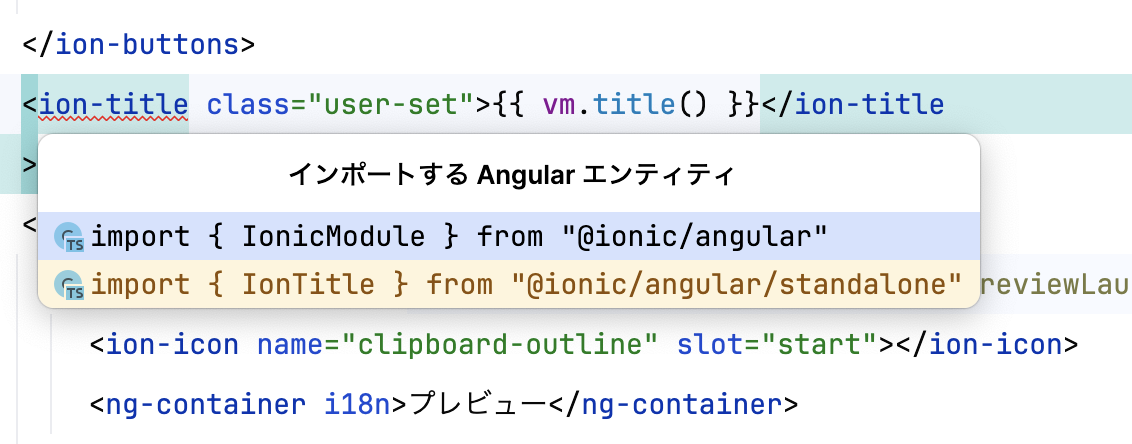
On a team, some developers import from groups and others from the package directly. This approach is not realistic.
You don't have to call addIcons in every component.
You're more than welcome to register them in main.ts or app.component.ts.
The "correct" way to use IonIcon is to call addIcons for icons used in that component. Strictly speaking, addIcons registers icons on the window object. When IonIcon renders, it reads the window to find the icon. So if addIcons ran before IonIcon displays, the icon can show.
Example: use CloseOutline (name=close-outline) on both page A and page B. Page A always appears before page B.
Page A → navigate → Page B
If only page B calls addIcons(CloseOutline), page A shows no icon and page B does. If only page A calls it, both pages show the icon.
※ Strictly, lazy loading of page B and whether constructor runs from prefetch matter, but I omit that.
So registering icons in main.ts or app.component.ts, which run before components display, is valid. Note that more icons registered there increase initial bundle size.
How to approach it
Ionic Components import
React, which has imported components individually from early on, is a good reference.
import React from 'react';
import { IonContent, IonHeader, IonPage, IonTitle, IonToolbar } from '@ionic/react';
import ExploreContainer from '../components/ExploreContainer';
import './Home.css';

const Home: React.FC = () => {
  return (
    <IonPage>
      <IonHeader>
        <IonToolbar>
          <IonTitle>Blank</IonTitle>
        </IonToolbar>
...
I asked people used to React: component groups are technically possible but a bad idea. IDE completion would diverge across authors and code would not stay consistent. React tried groups and moved to direct imports.
Unlike React, Angular components carry Custom Element loaders, so importing everything at once adds network load beyond bundle size. Importing only what you need is realistic.
To offset long import lists, you can move logic to a ViewModel. A simple example:
@Component({
  selector: 'app-settings',
  templateUrl: './settings.page.html',
  styleUrls: ['./settings.page.scss'],
  standalone: true,
  imports: [
    RouterLink,
    FormsModule,
    CommonModule,
    IonRouterLink,
    IonHeader,
    IonToolbar,
    IonTitle,
    IonContent,
    IonRefresher,
    IonRefresherContent,
    IonList,
    IonListHeader,
    IonLabel,
    IonItem,
    IonIcon,
    IonToggle,
    IonButton,
    IonNote,
    IonText,
  ],
})
export class SettingsPage implements OnInit, OnDestroy {
  // Call the ViewModel that contains the logic
  public vm = new ViewModel();

  // Keep only the lifecycle hooks here
  async ngOnInit() {
    await this.vm.initialize();
  }
  public ngOnDestroy() {}
}
class ViewModel extends StoreModel {
  public useShopMenu: boolean;
  public readonly helper = inject(HelperService);
  private readonly storage = inject(StorageService);

  async initialize() {
    this.helper.setDefaultThemeMode();
    this.storage.get(StorageKeyEnum.useShopMenu).then((useShopMenu) => {
      if (useShopMenu !== null) {
        this.useShopMenu = useShopMenu;
      }
    });
  }

  async doRefresh(event: RefresherCustomEvent) {
    event.target.complete();
  }

  public changeTheme(isDark: boolean) {
    this.helper.changeTheme(isDark);
  }
}
This keeps the component as a shell for imports and lifecycle while logic lives elsewhere. You can also keep both in one file if you prefer— class line count does not necessarily grow.
IonIcon
IonIcon is a bit different. Ideally you addIcons per component for only what you need. But addIcons is not tied to the build, so forgetting it does not fail the build— users may use an app with missing icons. The issue mentions this too; in practice you only get console.error in the browser, which is not enough.
Even when icons seem to work,
Page A → navigate → Page B
as above, display order may hide missing registrations. Another navigation path might show page B first and break icons. So I built this CLI to collect icons automatically:
https://github.com/rdlabo-dev/ionic-angular-collect-icons
It deduplicates icons from Ionic Angular components and calls addIcons in main.ts. Because it does not call addIcons per component, it is not the "correct" practice— it is the practical approach I use.
The library auto-generates and updates files like this:
export { keypadOutline, closeOutline, removeCircleOutline, addCircleOutline, arrowUpOutline, copyOutline, clipboardOutline, filterOutline, swapVerticalOutline, chevronDownOutline, imageOutline, documentOutline, add, wineOutline, receiptOutline, timeOutline, walletOutline, fileTrayStackedOutline, calendarOutline, documentTextOutline, logoApple, languageOutline, closeCircleOutline, pricetagOutline, arrowForwardOutline, cloudDownloadOutline, cloudUploadOutline, checkboxOutline, linkOutline, personCircleOutline, toggleOutline, printOutline, moon, fileTrayFullOutline, bagHandleOutline, codeWorkingOutline, analyticsOutline, trendingUpOutline, codeDownloadOutline, todayOutline, logoTwitter, readerOutline, checkmarkCircle, personOutline, ellipseOutline, locationOutline, listCircleOutline, barcodeOutline, albumsOutline, ellipsisHorizontalCircleOutline, addOutline, ellipsisHorizontalOutline, image, informationCircleOutline, earthOutline, bagCheckOutline, radioButtonOnOutline, exitOutline, trashOutline, swapHorizontal, alertCircle, home, paw, bagOutline, pinOutline, homeOutline, timerOutline, checkmarkCircleOutline, alertCircleOutline, settingsOutline, playOutline, arrowRedoOutline, briefcaseOutline, carOutline, gitCompareOutline } from "ionicons/icons";
It scans project templates and collects only icons in use. Then main.ts calls addIcons:
+ import { addIcons } from 'ionicons';
+ import * as allIcons from 'ionicons/icons';
+ import * as useIcons from '../use-icons';

  if (environment.production) {
    enableProdMode();
  }

+  addIcons(environment.production ? useIcons : allIcons);
environment.production branches because without running the CLI the export list stays stale— in development I register all icons for better DX. That inflates bundle size, so production uses only icons from use-icons.ts. One command runs it— try it when you can.
https://github.com/rdlabo-dev/ionic-angular-collect-icons
For now, this feels like the practical path.
Summary
I explored best practices for Ionic Angular Standalone. Standalone will change development a lot, so thinking about practices early improves DX. Do not postpone— consider it now.
See you next time.