
Today, July 18, Stripe launched Stripe Identity for general availability in Japan after a long invite-only beta. Stripe Identity makes identity verification easy to implement using Stripe’s SDK.
https://stripe.com/jp/identity
I received an invite last November and integrated Stripe Identity into a service I operate in production. I noticed several implementation pitfalls; here are four of them.
Four considerations
Stripe Identity bills per verification. When a user fails identity verification, you lose more than product opportunity and UX—you also incur Stripe Identity charges. Keep these four points in mind when you implement verification.
https://support.stripe.com/questions/billing-for-stripe-identity
1. Tell users which documents they can use
Stripe Identity shows users acceptable identity documents like this:
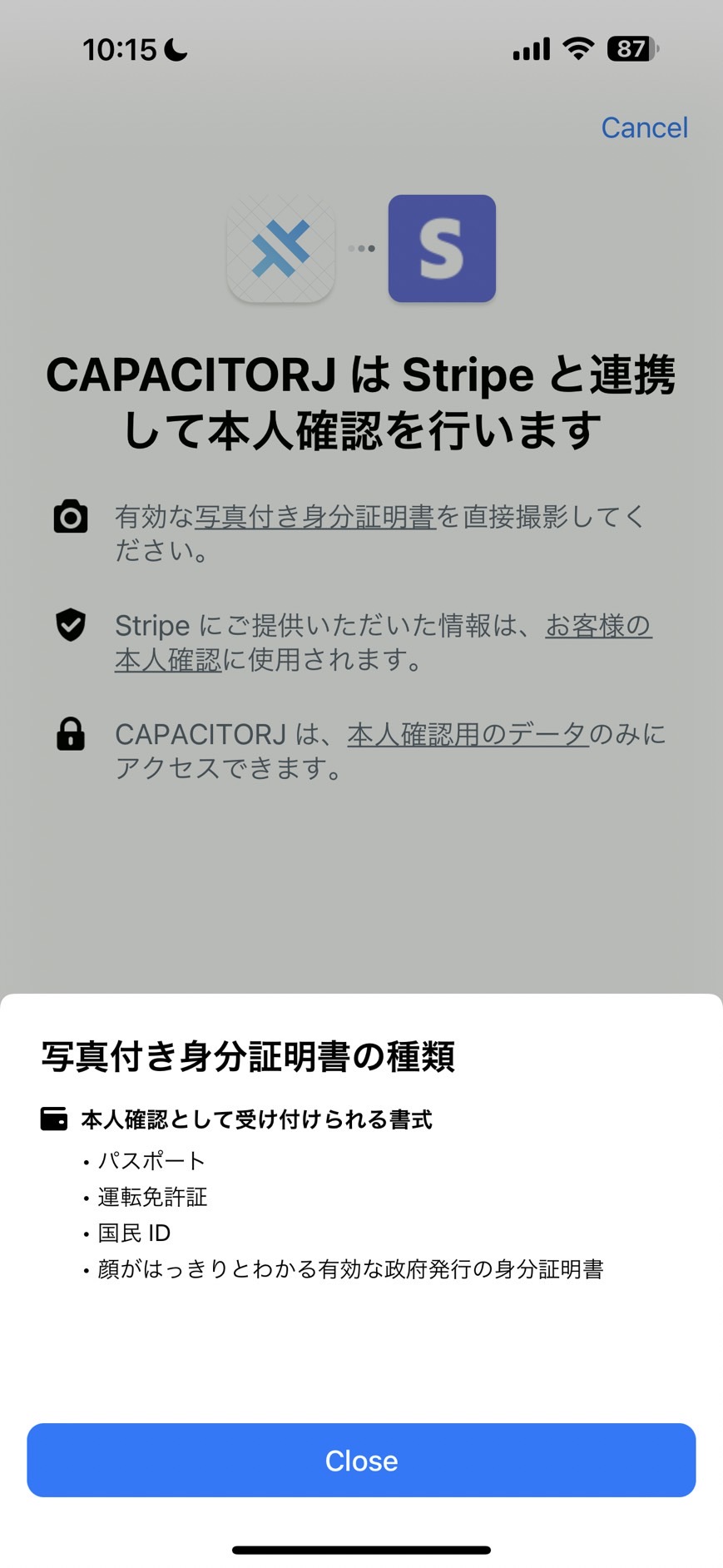
In practice, only four document types work in Japan: My Number card, driver’s license, passport, and residence certificate. Disability certificates are not accepted. That wording is technically accurate—disability certificates are issued by prefectures, designated cities, or core cities, not the national government—but whether users understand the distinction is another matter.
So it is important to tell users which documents they can use before they open Stripe Identity.
2. Ask users to remove My Number cards from protective cases
Initial My Number card shipments included protective cases to block the number and prevent skimming (distribution has since stopped). Many third-party cases are sold too, so users may still use them.
Leaving the card in a case makes automated document analysis in Stripe Identity much more likely to fail. Many users think a photo showing their face and address is enough without exposing the My Number itself, and shoot the card still in the case. If they use a My Number card, guide them to remove it from the case first.
3. Guide users on where to take photos
Most users shoot in bright places, but some think “if the text is readable, verification should pass” and photograph in dark environments. That also makes automated document analysis much more likely to fail. Poor image quality raises tampering suspicion. Fair enough.
Take photos in a well-lit place without glare or reflections
Guidance like that matters.
4. Do not notify users immediately on verification failure
Even with all of the above, documents that look fine to the human eye sometimes fail verification. Notifying users immediately leads to “Why?!” and repeated failures bill you each time. Notifying success right away improves UX, but failure notifications need careful design. I recommend messaging like:
Your document data could not be read correctly, so verification will take longer. Please wait a while.
Then have verification staff review manually and decide whether to mark success or finally mark Invalid. Especially now, failure notification types are limited; many failures arrive as unverified_other, so you cannot tell users “fix it this way.” Failure notification design is critical when using Stripe Identity.
https://docs.stripe.com/identity/selfie#document-failure
For reference, notification types look like this:
export const translateIdentityStatus = (): Record<string, string> => ({
  processing: '本人確認の検証フローを開始しました。',
  verified: '本人確認のすべてを正常に完了し、本人確認の特典を受け取りました。',
  abandoned: '途中で終了したため、本人確認検証フローは完了しませんでした。再度お試しください。',
  consent_declined: '必要な本人確認確認に対する同意を拒否したため、検証は失敗しました。再度お試しください。',
  country_not_supported: '本人確認をサポートしている国の身分証ではなかったため、検証は失敗しました。再度お試しください。',
  device_not_supported: 'デバイスにカメラ機能がないため、本人確認に失敗しました。再度お試しください。',
  document_expired: '身分証明書は期限切れであるため、本人確認に失敗しました。再度お試しください。',
  document_type_not_supported: '身分証明書がサポート外のため、本人確認に失敗しました。再度お試しください。',
  document_unverified_other: '身分証明書に問題があったため、本人確認に失敗しました。再度お試しください。',
  id_number_insufficient_document_data:
    '身分証明書に確認に必要なデータが含まれていなかったため、本人確認に失敗しました。再度お試しください。',
  id_number_mismatch: '身分証明書のID番号は、要求された身元確認のID番号と一致しなかったため、本人確認に失敗しました。再度お試しください。',
  id_number_unverified_other: '身分証明書のID番号に問題があったため、本人確認に失敗しました。再度お試しください。',
  selfie_document_missing_photo: '身分証明書に、身元確認に必要な写真が含まれていなかったため、本人確認に失敗しました。再度お試しください。',
  selfie_face_mismatch: 'ユーザーの顔は、要求された身元確認の身分証明書の顔と一致しません。再度お試しください。',
  selfie_manipulated: 'ユーザーの顔は、要求された身元確認の身分証明書の顔と一致しません。再度お試しください。',
  selfie_unverified_other: 'ユーザーの顔は、その他の理由で検証されませんでした。再度お試しください。',
  under_supported_age: 'ユーザーは、要求された身元確認の年齢要件を満たしていません。再度お試しください。',
});
Summary
Many identity verification services in Japan hide pricing (you only learn after requesting materials) and charge base fees. Stripe Identity’s clear published pricing and pay-as-you-go model is attractive. Still, keep the points above in mind and design how you will operate it.
See you next time.