
“Could users put the changes from this PR into a real app and try them?”
With an open source npm library, some things only become apparent after the package is installed in a real app, even after the code has passed review and CI. But if you publish a full release first just for testing, any problem you discover has already reached regular users. If you wait for the next full release, users cannot get even a small fix.
I therefore introduced per-PR beta releases for the npm packages I maintain. Once a PR passes CI, an owner or maintainer can comment /beta to make that exact commit installable from npm.
I am currently using this mechanism to test PR #131, “fix: support radio groups across inset lists,” for the iOS 26 theme.
When I commented /beta on the CI-approved commit 8d96f41c7cb3, the comment received an 👀 reaction and the workflow replied with an install command for an immutable version.
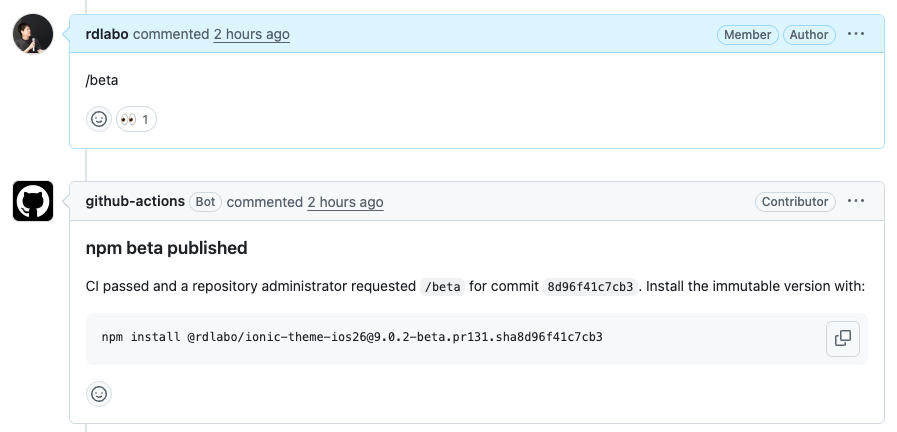
GitHub Actions posted this command to the PR automatically after publishing. With this one line, users can put the PR's changes into their own app without cloning and building the repository.
This lets them test changes in a real app before the full release. For a small change like this one, users who cannot wait for the full release can also choose to adopt just that fix early, with a clear understanding that it is a candidate build.
Keep the roles of latest, next, and beta separate
I treated npm dist-tags with the greatest care.
Without an explicit --tag, npm publish updates latest. That is the tag many users get when they install a package without specifying a version. If the publication path for a PR package were to touch latest by mistake, code that was still being tested would reach regular users. An OSS release flow must prevent that completely.
I divided publication into three explicit paths.
| Purpose | Trigger | npm dist-tag |
|---|---|---|
| Full release | vX.Y.Z created by npm run release |
latest |
| Revision/prerelease | vX.Y.Z-* created by npm run release |
next |
| PR candidate | Maintainer /beta command or PR merge |
beta |
The beta workflow verifies once more immediately before publishing that DIST_TAG is literally the string beta. It never offers latest or next, which belong to the full release flow, as selectable tags for a candidate release.
if [ "$DIST_TAG" != "beta" ]; then
  echo "Refusing unsupported dist-tag: $DIST_TAG"
  exit 1
fi

npm publish "$PACKAGE_ARCHIVE" \
  --ignore-scripts \
  --provenance \
  --access public \
  --tag beta
Publishing beta or next does not move latest. The existing full-release path and the path for distributing PR candidates remain separate.
Implementing the design with GitHub Actions and OIDC
That covers the publication-path design. Now, how does it work in practice?
The workflow has four main stages.
PR commit
  │
  ├─ Repository-specific required CI
  │
  └─ build → npm pack → immutable artifact
                              │
maintainer posts /beta        │
  └─ 👀 reaction              │
       └─ verify CI, permission, and SHA ┘
                    │
                    └─ publish beta to npm via OIDC
                                   │
                                   └─ comment npm install command on PR
The key design choice is that building the PR's code and publishing to npm do not happen in the same job.
The YAML below omits some validation to make the relationship between the stages easier to see. You can inspect the actual workflows in Package Candidate and Release.
1. Build the artifact on the PR side without publication permissions
The Package Candidate workflow runs whenever a PR is opened or updated. It checks out the target head SHA, installs dependencies, builds the package, and runs npm pack.
on:
  pull_request:
    branches: [main]
    types: [opened, synchronize, reopened, ready_for_review]

permissions:
  contents: read
  pull-requests: read

jobs:
  pack:
    steps:
      - uses: actions/checkout@v6
        with:
          repository: ${{ github.event.pull_request.head.repo.full_name }}
          ref: ${{ github.event.pull_request.head.sha }}
          persist-credentials: false

      - run: npm ci
      - run: npm run build
      - run: npm pack --ignore-scripts --pack-destination "$RUNNER_TEMP/npm-candidate"

      - uses: actions/upload-artifact@v7
        with:
          name: npm-candidate-${{ github.event.pull_request.head.sha }}
          path: ${{ runner.temp }}/npm-candidate/*.tgz
This workflow has neither id-token: write nor an npm token. Even if a malicious PR changes a build script, it cannot publish anything to npm from here.
Before the build, the version is rewritten to <base>-beta.pr<PR number>.sha<SHA>. The artifact name also includes the full SHA, making it possible to verify later which workflow run built it and from which commit.
2. First, respond to /beta with an 👀 reaction
I considered using GitHub approval as the publication condition. However, if another commit is added after approval, the reviewed code and the code sent to npm are no longer the same.
Instead, /beta authorizes only the head SHA that was current when the comment was posted, not the PR as a whole. No matter who adds the change, a new commit invalidates the previous authorization. The new SHA must pass CI, and an owner or maintainer must comment /beta again.
The workflow receives /beta through GitHub's issue_comment event because regular comments on a PR are also handled by the Issue Comments API.
After confirming that the comment body is an exact match and that the target is a PR, the workflow uses actions/github-script to check the commenter's permission. If it is admin or maintain, it attempts to add the 👀 reaction with peter-evans/create-or-update-comment.
on:
  issue_comment:
    types: [created]

jobs:
  beta-reaction:
    if: >-
      github.event.issue.pull_request &&
      github.event.comment.body == '/beta'
    permissions:
      pull-requests: write

    steps:
      - name: Check owner or maintainer permission
        id: permission
        uses: actions/github-script@v8
        with:
          script: |
            const { data } = await github.rest.repos.getCollaboratorPermissionLevel({
              owner: context.repo.owner,
              repo: context.repo.repo,
              username: context.payload.comment.user.login,
            });
            return { authorized: ['admin', 'maintain'].includes(data.permission) };

      - name: Add reaction to authorized beta comment
        if: fromJson(steps.permission.outputs.result).authorized
        uses: peter-evans/create-or-update-comment@v5
        continue-on-error: true
        with:
          comment-id: ${{ github.event.comment.id }}
          reactions: eyes
The 👀 means “command received”; it does not indicate a successful publication. The workflow then verifies that the PR is open and not a draft, along with the required CI, the PR head SHA, the commenter's permissions, and the candidate artifact. It checks the head SHA and permissions again immediately before publication. If CI is still running, it does not publish and instead attempts to post a comment explaining which checks remain. The maintainer must run /beta again after CI succeeds.
3. Publish through OIDC without storing an npm token
Publication uses npm Trusted Publishing.
On npm, I register the GitHub repository and workflow file as a Trusted Publisher for the package. On the GitHub Actions side, only the publishing job receives id-token: write.
publish-candidate:
  needs: authorize-candidate
  if: needs.authorize-candidate.outputs.allowed == 'true'
  permissions:
    actions: read
    contents: read
    id-token: write
    pull-requests: read

  steps:
    - uses: actions/setup-node@v6
      with:
        node-version: 24
        registry-url: https://registry.npmjs.org

    - uses: actions/download-artifact@v8
      with:
        name: ${{ needs.authorize-candidate.outputs.artifact }}
        run-id: ${{ needs.authorize-candidate.outputs.run-id }}

    - run: |
        npm publish "$PACKAGE_ARCHIVE" \
          --ignore-scripts \
          --provenance \
          --access public \
          --tag beta
GitHub Actions issues a short-lived OIDC ID token, and npm verifies that claims such as the repository and workflow match the registered publisher. There is no need to store a long-lived NPM_TOKEN in GitHub Secrets.
OIDC does not, however, make the artifact's contents safe. OIDC controls who can publish. The artifact, SHA, and package identity checks must separately guarantee what gets published.
The permission boundary would collapse if a job with id-token: write checked out and ran PR code. The publishing job therefore never runs PR code; it only downloads the .tgz created by the read-only workflow. It also compares the package name, version, registry, SHA, and the workflow run that created the artifact, publishing only when every value matches. If the PR changes the workflow used to make the release decision, publication from that PR is blocked as well.
The workflow also uses --provenance, so the npm package records which source repository and GitHub Actions workflow built and published it.
4. Comment with the install command only after publication succeeds
The 👀 reaction and the publication-complete comment serve different purposes.
The completion-comment job declares both authorization and publication as dependencies, and runs only if publish-candidate succeeds.
comment-candidate:
  needs: [authorize-candidate, publish-candidate]
  if: >-
    always() &&
    needs.authorize-candidate.outputs.allowed == 'true' &&
    needs.publish-candidate.result == 'success'
  permissions:
    issues: write
    pull-requests: write

  steps:
    - name: Comment exact install command
      uses: actions/github-script@v8
actions/github-script builds the command from the package name and immutable version.
### npm beta published

CI passed for commit `8d96f41c7cb3`. Install the immutable version with:

```sh
npm install @rdlabo/ionic-theme-ios26@9.0.2-beta.pr131.sha8d96f41c7cb3
```
The comment body also contains an HTML marker with the SHA. If the same workflow is rerun, it updates the existing comment for that SHA instead of adding another one.
The beta dist-tag moves whenever the next candidate is published. The PR therefore tells users to install an immutable version containing the PR number and SHA, not @beta. Because the npm registry does not allow the contents of an existing version to be overwritten, the exact package that was tested remains reproducible later.
I kept the comment step separate from the publishing job. If npm publication succeeds but the GitHub API temporarily fails, the release itself should not be rolled back into a failed state. The comment is best effort, and the install command also remains in the Job Summary.
Automatic publication on merge joins the same publishing job. A push to main alone does not satisfy the trigger. After receiving workflow_run, the workflow verifies that the SHA is an actual PR merge commit and the current main HEAD, and that both the repository-specific required CI and Package Candidate have succeeded for the same SHA. Only then does it publish to beta. If the same version already exists on npm, it is not published again.
Rolling it out to npm libraries listed on docs.rdlabo.dev
I first tested this mechanism with the iOS 26 and Material Design 3 themes for Ionic. I then expanded it to the npm libraries listed on docs.rdlabo.dev. The design handles not only single-package repositories, but also repositories that publish multiple packages together, such as the Capacitor Stripe plugin.
The repository-specific configuration varies: a single package, npm workspaces, custom build steps, or multiple required CI workflows. The publication boundaries nevertheless stay the same.
- Only full releases use
latest - Revisions and prereleases use
next - Only PR candidates use
beta - Candidate builds come from the exact SHA that passed CI
- If the commit changes after authorization, authorization must be granted again
- Publication permissions never exist where PR code runs
Make the README an operating contract, not just the workflow
If someone must read GitHub Actions YAML to learn the publication requirements, the OSS project has not documented its operation well enough. I therefore added a Prerelease channels section to each repository's README.
The README explains that only an exact /beta command from an owner or maintainer is accepted, required CI must pass, and a new commit requires another /beta. The same place documents automatic publication after a PR merge, the fact that a direct push to main does not publish a candidate, and the roles of latest, next, and beta.
A PR that changes a workflow used for the release decision cannot publish beta from itself. The workflow change must first be reviewed and merged into main; it becomes available to the next PR. This condition is documented in the README too, so the reason /beta did not work is not confined to an Actions log.
The implementation enforces the boundary by stopping invalid publications. The README lets maintainers and contributors operate from the same shared assumptions. The code and documentation are maintained together as one release specification.
Test with real users before the full release
A pull request is not only a place to merge code. It can also be a place to hand a change to users and let them test it in their real projects.
For an OSS library in particular, it is difficult for maintainers to reproduce every usage pattern in their own test environments. With per-PR npm packages, we can ask users to “install this one line and try it” instead of merely asking them to read the diff.
This makes it easier to get feedback before the full release. Small fixes that cannot wait for the next release can reach the users who need them first. All the while, the latest tag used by regular users remains untouched.
I have brought this quick path for testing PR changes into my own OSS projects. Going forward, I can validate not only the code review, but also the result of putting the change into a real app before the release.
See you next time.